On this page
Which cycle should I choose on my Bertazzoni dishwasher?#
Choose by soil and load. Regular suits everyday dishes, Auto adapts to any soil level, Pots & Pans is for heavily soiled cookware, Crystal & China for delicate lightly soiled items, and Quick for lightly soiled dishes. Rinse & Hold and Soak & Wash cover dishes you wash later. 1
The manual gives times and water use for each cycle on a model with the full set. Some cycles depend on the model, and the table marks them. 1
| Cycle | For | Time | Water |
|---|---|---|---|
| Regular | Normally soiled dishes; adjusts to soil; lowest energy and water use | 2:02 to 2:25 | 2.3 to 4.5 gal |
| Auto | All soil levels; adjusts time, temperature and water | 1:50 to 2:35 | 3.7 to 6.2 gal |
| Pots & Pans | Heavily soiled pots and casserole dishes | 2:10 | 4.8 gal |
| Crystal & China | Temperature-sensitive, lightly soiled dishes | 1:30 | 3.7 gal |
| Quick | Lightly soiled dishes | :50 | 3.6 gal |
| Rinse & Hold | Rinses and holds dishes for a later wash; no detergent | :15 | 1.2 gal |
| Soak & Wash (some models) | Heavily soiled dishes not washed right away | 2:45 | 5.9 gal |
| Normal Plus (some models) | Freshly soiled everyday dishes | 1:57 | 4.7 gal |
For powder detergent, the table shows 1 3/4 tbsp (25 ml) for most cycles and 1 tbsp (15 ml) for Crystal & China, and none for Rinse & Hold. More may be needed with heavier soil or harder water. 1 Our guide on cloudy, spotted or dirty dishes covers detergent in more depth.
What do the options do?#
Options change a cycle. Half Load washes only the upper rack, the lower rack or both and cuts time, energy and water. Sanitize raises the rinse temperature. Scrub lengthens the wash. Extra Dry adds heating and drying. Delay postpones the start. Accel and Stealth appear on some models. 2
| Option | What it does |
|---|---|
| Half Load | Directs washing to the upper rack, lower rack or both; shortens the cycle and saves energy and water 2 |
| Sanitize | Raises rinse water temperature to eliminate bacteria up to 99.9% 2 |
| Scrub | Increases wash time and water temperature to dissolve detergent 2 |
| Extra Dry | Adds heating and drying steps; raises rinse water temperature and extends dry time 2 |
| Delay | Starts the cycle 1 to 24 hours later, in 1-hour steps 2 |
| Accel (some models) | Shortens the cycle with less water; shorter cycle time affects drying 2 |
| Stealth (some models) | Reduces the sound rating by 3 dBA and lengthens the wash 2 |
Sanitize is not suitable for the Rinse & Hold and Crystal & China cycles. 1 If the sanitizing LED does not light at the end, the manual says the cycle may have been interrupted or the water could not be heated enough. 2
How do I confirm an option or a delay?#
Press the option button until its light comes on, then press Start/Pause and close the door within 4 seconds. The option only activates when you do that. For Half Load, press the button once for the upper rack, twice for the lower rack and three times for both. 2
For a delayed start, press the plus button to add one hour for each press. The display alternates the cycle length and the delay for 2 seconds each. Press the minus button to shorten the delay. Then press Start/Pause and close the door within 4 seconds, as for the other options. 2
If an option seems to be ignored, the usual reason is that the door was not shut inside the 4 seconds. Open it and set the option again.
What do the colors of the floor light mean?#
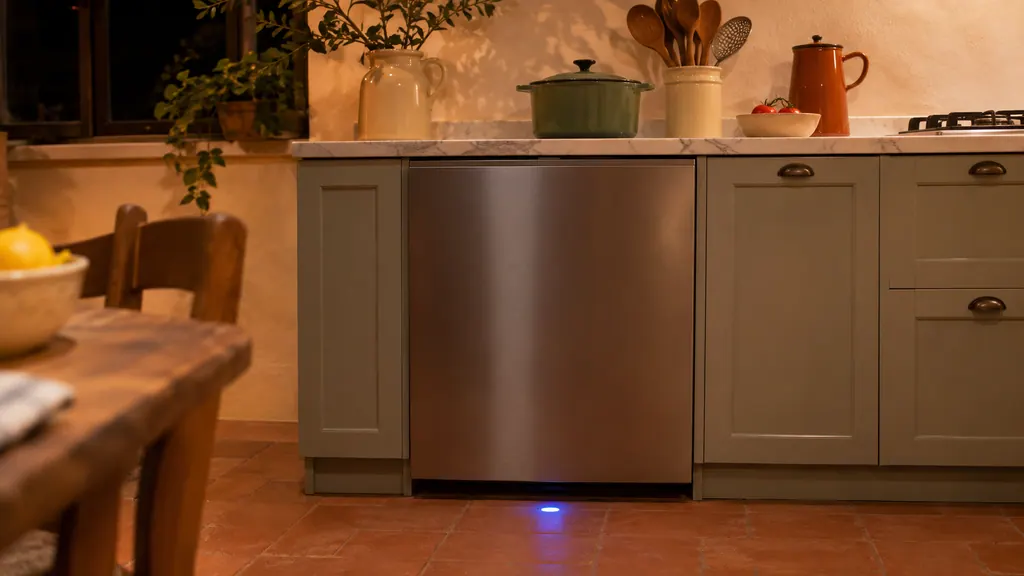
Your dishwasher may have an internal LED light and a floor projection that shows the state during a cycle. Red continuous means a program is running, red flashing means a program was canceled, red flashing rapidly means an error, and green continuous means the program is finished. 3
For rapid red flashing, the manual sends you to its section on automatic warnings. Our page on dishwasher panel lights flashing and the guide on codes versus the salt and rinse-aid lights cover what to do next.
A canceled program, shown by slow red flashing, is not an error. It means you or the machine stopped the program. Start the cycle again after you check the door is closed.
How do I use the settings menu?#
With the machine on, hold the Extra Dry button for 3 seconds. Use the Delay buttons to move between settings, press Half Load to open one, change it with the Delay buttons and press Half Load to save. Hold Extra Dry for 3 seconds again, or switch off, to leave. 4
There are six settings.
| Setting | Levels | Factory |
|---|---|---|
| Water hardness | SL1 to SL6 | SL1 |
| Rinse-aid | r:1 to r:5 | r:4 |
| Buzzer sound control | b:0 (all sounds off) to b:3 (highest) | b:3 |
| Start program | LP0 starts with Regular; LP1 starts with the last program and option | LP0 |
| Save power mode | SP0, SP1, SP2 | SP1 |
| Factory settings | FS1 restores all defaults | FS0 |
The factory-settings entry deserves a warning: choosing FS1 sets everything back to default, including your water hardness and rinse-aid choices. 4
What do the save power levels do?#
They decide when the screen, the lights and the machine switch off. At the factory level SP1 the screen goes off after 4 minutes and the machine after 15 minutes without use. At SP2 the machine stays on until you press On/Off. 4
At SP0 the interior lights (if fitted) stay off. At SP1 they go off after 4 minutes when the door is open. 4
This explains a common worry. A dishwasher that is dark when you come back to it is usually not broken; it has switched itself off after 15 minutes of no activity. At SP2, with the machine on, the interior lights stay on while the door is open, and the machine does not turn off except by pressing On/Off. 4
When should I book a technician?#
Book a visit if the floor light flashes red rapidly and a code shows, if the machine shuts off in a cycle with power at the outlet, or if cycles run far beyond the times in the table. The floor light and the display tell you what to report. 3
We are an independent repair company, not part of Bertazzoni. A dishwasher under the manufacturer's own warranty is repaired through the manufacturer. Otherwise book a visit. The technician agrees the price with you before any work starts, and the exact cost is confirmed after the on-site diagnostic. Our dishwasher repair page lists what we look at.
Sources#
- INSTALLATION MANUAL / USER AND MAINTENANCE MANUAL DW24T3IXT/26 - DW24T3IPT/26Bertazzoni S.p.A. (official manual PDF, us.bertazzoni.com Specifications Library) · PDF created 13.11.2025 (no printed edition) · PDF p41: wash cycles table
- INSTALLATION MANUAL / USER AND MAINTENANCE MANUAL DW24T3IXT/26 - DW24T3IPT/26Bertazzoni S.p.A. (official manual PDF, us.bertazzoni.com Specifications Library) · PDF created 13.11.2025 (no printed edition) · PDF p43: wash options
- INSTALLATION MANUAL / USER AND MAINTENANCE MANUAL DW24T3IXT/26 - DW24T3IPT/26Bertazzoni S.p.A. (official manual PDF, us.bertazzoni.com Specifications Library) · PDF created 13.11.2025 (no printed edition) · PDF p45: lights, LED indicator and machine status
- INSTALLATION MANUAL / USER AND MAINTENANCE MANUAL DW24T3IXT/26 - DW24T3IPT/26Bertazzoni S.p.A. (official manual PDF, us.bertazzoni.com Specifications Library) · PDF created 13.11.2025 (no printed edition) · PDF p44: menu settings